

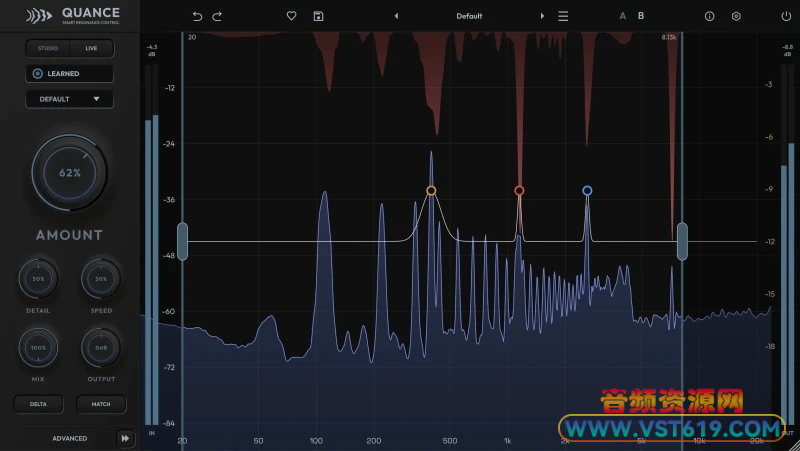
共振抑制器插件Codwaves Quance
VST插件格式:
VST3
Codwaves Quance 智能共振抑制器,实时侦测刺耳共振峰,音色与瞬态保护保留细节,自带学习检测、多模式、零延迟直播引擎,响度匹配、Delta监听,适合人声、鼓组与母带处理。
翻译:
Quance —— 共振抑制器 (Resonance Suppressor)
精准的共振控制,懂得何处该“手下留情”。
Quance 会实时分析您的音频,识别出那些导致听觉疲劳的共振峰,并在播放过程中对其进行抑制。同时,构成您音色核心的谐波、瞬态和音质特征将保持原样。
动态共振控制
Quance 仅在频谱出现问题时介入,且仅在必要时发挥作用。通过“Delta”(差值)模式,您可以单独听到被从信号中剔除的部分——即那些恼人的“嗡嗡声”或“嘶嘶声”,而乐器本身的声音几乎不会受到影响。
每位音频工程师都深知这一难题
在消除刺耳感时,往往会不经意间损失掉混音中您想要保留的特质。例如,人声的元音失去了锋芒,小鼓失去了清脆的冲击感;虽然混音变得更平滑了,却也显得缺乏力度。
Quance 的诞生正是为了解决这一问题。它内置了数百个自适应频谱滤波器,仅在频谱出现问题时介入,且仅在必要时发挥作用。此外,保护系统会与检测器协同工作,确保不会进行损害音质的过度处理。
您只需通过一个简单的“强度”(Amount)旋钮,即可调节处理的力度。Quance 会自动确定处理位置,并每隔几毫秒更新一次处理策略。
与专业人士共同打造
Quance 的构思源于一个问题:如果让音频工程师参与共振控制工具的设计,会怎样?我们审视了现有的工具,并致力于将其做得更好。随后,我们采取了开发者应有的做法:将原型提供给顶尖的录音工程师和制作人,并征求他们的改进建议。
我们收到的反馈非常务实——“能不能增加这个功能?”“能不能让那个操作更简便?”每一次交流都聚焦于工作流程与性能表现,而每一轮反馈都不断完善了这款插件。Quance 便是最终的成果。
当我们收到来自顶尖专业人士的肯定反馈时,我们便知道,我们已经实现了既定目标。
五大核心功能:
智能学习 (Intelligent Learn):从音频本身获取“先发优势”
播放音频中令您困扰的部分,然后点击“学习”(Learn)。Quance 会进行分析,找出最显著且稳定的共振点,并精准锁定这些位置,同时根据每个共振峰的特性自动匹配其带宽。此外,它还会缩小问题区域周边的检测范围。
有些问题并非时刻存在。某些词汇中可能会出现齿音,或者房间共鸣可能仅在某个特定音高上显现。镲片在副歌部分听起来可能很刺耳,但在主歌部分却并无此问题。单击即可开启“开放式”处理流程——软件会持续监听问题片段,并在处理完成后自动停止;双击则可开启固定时长为 8 秒的处理流程。
“学习”(Learn)功能会根据你所选的“模式”(Mode)进行调整,因此处理人声与处理鼓组时的逻辑会有所不同。该功能绝不会改变你的“强度”(Amount)设置,且整个处理过程仅占用一个“撤销”(Undo)步骤。你可以选择保留、进一步微调,或者直接舍弃处理结果。
音色与瞬态保护:在清理杂音的同时,保留原始表演的特质
“音色保护”(Tone Protect)功能会追踪基音、泛音及人声共振峰;当削减处理可能损害这些成分时,它会自动减少削减量。即使对人声进行强力处理,元音的音色依然能得到保留;在修饰大提琴时,其琴体共鸣也能保持完整。
“瞬态保护”(Transient Protect)功能能够识别鼓点、辅音或拨弦声的“瞬态”(即声音的起始冲击),并在瞬态经过时减弱削减力度。瞬态产生的宽频爆发有时看起来很像共振,但 Quance 能够准确区分两者。这确保了军鼓依然保持清脆的冲击感,人声也依然清晰通透。
这两项功能会随“模式”(Mode)的不同而动态调整。例如,“鼓组”(Drums)模式更侧重于瞬态保护,而“人声”(Vocal)模式则更侧重于音色保护。如果遇到特定音高的问题(如持续的共鸣音或房间驻波导致的啸叫),只需调低保护力度,让 Quance 介入处理即可。
抑制与保护:八个焦点(Focus Points)与四个检测范围
自动检测功能可完成大部分工作,而“焦点”则用于精细调节。在图表上双击即可添加一个焦点:向上推可提高该频率下的检测灵敏度,向下拖则可保护该区域免受削减处理。你最多可同时设置八个焦点,每个焦点均可自定义宽度——从窄频陷波到宽频曲线,灵活多变。
在调整“强度”(Amount)之前,你可以在贝斯的基音处设置一个“保护”(Protect)点;或者在人声齿音明显的 6 kHz 频段处添加一个“抑制”(Tame)点。点击任意焦点上的耳机图标,即可对该频段进行“独奏”(Solo)监听;在拖动调节时,你可以通过听觉精准定位共振点。
“检测范围”(Detection Ranges)用于限定 Quance 的处理作用域。可同时使用多达四个处理单元,一次性解决中低频的浑浊感和高频的齿音问题,同时保持“临场感”频段(presence region)不受影响。插件内置七种预设(涵盖从“齿音”到“军鼓余音”等多种应用场景),只需右键即可轻松调用。
从零延迟到超高解析度:提供五种质量等级。
Quance 搭载了四种不同的处理引擎(分为两组),让插件能够灵活适配您的需求,而非强迫您去适应插件的工作方式。
Studio 版本采用三频段多分辨率引擎。在低频段,较长的分析窗口能够捕捉到窄带房间共振(room modes)和低频余音(bass ring);而在高频段,较短的分析窗口则能确保瞬态(transients)保持清晰锐利。Studio Pro 是默认且高效的版本。Studio Ultra 则将所有分析窗口的长度加倍,从而提供 Quance 所能达到的最佳频率分辨率——当您的数字音频工作站(DAW)能够处理延迟补偿时,它是混音和母带制作的理想之选。
Live 版本专为录音(tracking)、监听、流媒体直播和舞台演出而设计。其中的“轻量”(Light)和“标准”(Normal)模式可提供低延迟的窗口化处理。而“零延迟”(Zero)模式则有所不同:音频信号完全不经过 FFT(快速傅里叶变换)处理。相反,它通过 48 个最小相位滤波器(minimum-phase filters)在采样对齐的路径上进行处理,从而实现了真正的零延迟。您可以放心地将其用于演唱、监听或现场表演。
在会话过程中切换版本时,Quance 会进行平滑的交叉淡入淡出(crossfade),不会产生任何爆音或杂音。
自动响度匹配(Automatic Loudness Matching):专注于音色,而非音量
当您消除共振时,音量往往会随之下降。在快速的 A/B 对比测试中,音量较小的音频听起来可能会显得更差;这种心理偏差常让许多工程师对原本正确的处理决策产生怀疑。
开启“匹配”(Match)功能后,Quance 会利用心理声学测量方法,持续监测输入和输出信号的感知响度,并自动进行补偿调整。无论是进行旁路(bypass)对比、A/B 快照切换,还是试听预设,一切评估都变得公平公正。您只需判断处理后的音轨听起来是否更好即可。
配合 Delta 功能使用,您可以仅听到 Quance 所消除的那部分音频。Delta 让您直观地看到被剔除的内容,而“匹配”功能则能帮您判断这种处理是否值得。
其他功能特性:
六种模式
“默认”(Default)、“人声”(Vocal)、“乐器”(Instrument)、“鼓组”(Drums)、“混音”(Mix)和“强力”(Hard)模式,会针对不同类型的音频素材,自动调整检测器和保护系统的参数。您的旋钮设置保持不变,改变的是 Quance 的监测重点及其保护对象。
自适应源素材的检测机制
阈值会根据音频素材的长期频谱特征进行动态调整,因此,即便音频源本身音色偏亮,也不会因为“太亮”而受到过度处理。
侧链(Sidechain)遮蔽消除
将主唱信号发送至吉他总线(Guitar Bus)上的 Quance,吉他信号便只会在人声需要空间频段处进行衰减。这相当于一种“频率选择性闪避”(frequency-selective ducking),且不会导致整体音量下降。
四种立体声模式
链接、双声道、中侧和 M-S 链接。精准捕捉位于中央或两侧的刺耳声音,避免声像偏移。
增量监听
只听被移除的部分。只听到嗡嗡声和嘶嘶声,乐器本身的声音则微乎其微。
细节和速度
平滑宽广的渐强或精准捕捉针尖般的峰值。用衰减器营造呼吸感,或用钳制器钳住辅音。
可选最大切频上限
关闭此功能,音量控制切频深度。开启此功能,确保总线和主输出达到最佳效果。
53 个以任务命名的出厂预设
明亮麦克风驯服器、播客房间环音、镲片刺耳度、流媒体润色。名称清晰地表明了预设的功能,每个预设都保持完全开放的检测范围,确保所有细节都能被捕捉到。
A/B 快照和独立撤销
两个完整的设置可供切换,此外还有一个历史记录,记录了每个旋钮的调整过程,支持学习模式和点编辑。
线性相位或最小相位
最小相位模式保持打击乐器音色的自然感。线性相位模式则能通过混音控制实现清晰的并行处理。
Quance 的适用场景:
人声和对话
刺耳的高频、明亮的麦克风音色、以及某些词语上明显的齿音。人声模式可以保护共振峰,而学习模式则可以找出问题所在。对于播客和配音,它还能消除未经处理的空间混响。
鼓组
刺耳的军鼓声、嘶嘶作响的镲片声、以及房间麦克风的闷音。鼓组模式能够保留鼓点原汁原味,并抑制鼓点之间的混响和泛音。
吉他、键盘和弦乐
嘶嘶作响的失真、原声吉他拨片的刺耳感、尖锐的钢琴声以及高音弦的沙哑感。乐器模式能够保留和声的饱满度,同时降低刺耳感。
总线和母带
在复杂的总线上出现低中频浑浊,以及播放三次后就让人耳朵疲劳的混音。混音模式能够以更慢、更宽广的方式处理,并降低混音的上限。最终效果是混音更加柔和,但整体听起来依然饱满。
采样和循环
在循环接近节拍之前对其进行去刺耳处理,使其更好地融入混音,而不是喧宾夺主。
录音与现场演出
Live Zero 可在监听链路中实现共振控制,且不会增加任何延迟。歌手在耳机中能听到更平滑顺畅的人声,而负责现场扩声的工作人员则获得了一款能够根据场地环境做出响应的利器。
原文:
Quance – Resonance Suppressor
Resonance control that knows what to leave alone.
Quance checks your audio, finds the peaks that make listening tiring, and reduces them as you play. The harmonics, transients, and tone that shape your sound stay the same.
Resonance control in motion
Quance works only where the spectrum causes problems, and only as long as needed. Delta plays back what is leaving the signal on its own: rings and fizz, very little of the instrument.
Every engineer knows this problem
When you cut harshness, you often lose something you want in the mix. The vowel loses its edge, the snare loses its snap, and while the mix gets smoother, it can also feel less powerful.
Quance was made to solve this. Hundreds of self-adjusting spectral filters work only where the spectrum causes problems, and only as long as needed. Protection systems work with the detector to avoid cuts that could harm your sound.
You choose how much cleanup you want using a simple amount control. Quance finds where to apply it and keeps updating its choices every few milliseconds.
Built With Professionals
Quance began with a question: What if engineers helped design resonance control? We looked at current tools and set out to make them better. Then we did what every developer should do: we shared our prototypes with top recording engineers and producers and asked how we could improve them.
The feedback we received was practical. Could we add this? Could we make that easier? Every conversation focused on workflow and performance, and each round of feedback shaped the plugin. Quance is the result.
When we started getting emails like this from a top professional, we knew we had achieved our goal.
The Five Killer Features:
Intelligent Learn: a head start from the audio itself
Play the part that bothers you and press Learn. Quance listens, finds the most noticeable stable resonances, and puts focus points right on them, matching each width to its peak. It also narrows the detection range around the problem area.
Some problems don’t happen all the time. Sibilance might show up on certain words, or room ring might only appear on one note. A cymbal could sound harsh in the chorus but not in the verse. Click once to start an open-ended pass that listens through the problem part and tells you when it’s done. Double-click for a fixed eight-second pass.
Learn follows the Mode you choose, so a vocal pass works differently from a drum pass. It never changes your Amount setting, and the whole result is one undo step. Keep it, refine it, or throw it away.
Tone and Transient Protection: clean up without losing the performance
Tone Protect tracks fundamentals, overtones, and vocal formants, holding back reduction where a cut would harm them. Push a vocal hard and the vowels keep their color. Tame a cello and its body stays intact.
Transient Protect detects the attack of a drum hit, a consonant, or a pluck, and eases the reduction as it passes. A transient’s wide burst can look like a resonance, but Quance can tell the difference. The snare keeps its crack and the vocal keeps its clarity.
Both features change with Mode. Drums mode focuses more on transient protection, while Vocal mode focuses on tone. If you’re dealing with a pitched problem, like a ringing note or a howling room mode, turn protection down and let Quance handle it.
Tame and Protect: eight focus points, four detection ranges
Automatic detection does most of the work. Focus points handle the rest. Double-click the graph to add one. Push it up to make detection more sensitive at that frequency, or pull it down to protect that area from reduction. Use up to eight at once, each with its own width, from a narrow notch to a broad curve.
Put a Protect point over the fundamental of a bass before you adjust Amount. Add a Tame point at 6 kHz on a sibilant vocal. Click the headphones on any point to solo that band and find the resonance by ear while you drag.
Detection ranges control where Quance can work. Use up to four at once to tame low-mid mud and top-end sibilance in one go, while leaving the presence region untouched. Seven range presets, from Sibilance to Snare Ring, are just a right-click away.
Zero latency to ultra-high resolution: five quality grades
Quance has four different processing engines in two groups, so the plugin adapts to your needs instead of making you adapt to it.
Studio uses a three-band multi-resolution engine. Long analysis windows in the lows catch narrow room modes and bass ring, while short windows in the highs keep transients sharp. Studio Pro is the efficient default. Studio Ultra doubles every window for the best frequency resolution Quance offers, perfect for mixing and mastering when your DAW handles compensation.
Live is made for tracking, monitoring, streaming, and stage use. Light and Normal modes give you low-latency windowed processing. Zero mode is different: the audio never goes through an FFT. Instead, reduction uses 48 minimum-phase filters on a sample-aligned path, so Quance reports zero latency. You can sing, monitor, or perform live with it.
Switch grades during a session and Quance crossfades smoothly. No clicks.
Automatic Loudness Matching: judge tone, not level
When you remove resonances, the level drops. Quieter audio can sound worse in a quick A/B test, and that bias has made many engineers second-guess a good choice.
Turn on Match and Quance constantly measures the perceived loudness of input and output using a psychoacoustic measurement, then adjusts for the difference. Bypass comparisons, A/B snapshots, and preset auditions all become fair. All you have to judge is whether the track sounds better.
Pair it with Delta, which plays only what Quance is removing. Delta shows you what’s being taken out. Match helps you decide if it was worth it.
The rest of the feature set:
Six Modes
Default, Vocal, Instrument, Drums, Mix and Hard each retune the detector and the protection systems for a family of material. Your knobs stay put. What changes is what Quance listens for and what it defends.
Detection that adapts to the source
The threshold follows your material’s long-term spectrum, so a naturally bright source isn’t punished for being bright.
Sidechain unmasking
Send the lead vocal into Quance on the guitar bus and the guitars dip only where the vocal needs space. A frequency-selective duck with no overall level drop.
Four stereo modes
Linked, Dual, Mid-Side and M-S Link. Chase harshness that lives in the centre or the sides without the image wandering.
Delta monitoring
Hear only what is being removed. Rings and fizz, very little of the instrument.
Detail and Speed
Smooth broad build-ups or snipe needle-thin peaks. Breathe with a pad or clamp a consonant.
Optional Max Cut ceiling
Leave it off and Amount governs depth. Switch it on for a guaranteed worst case on buses and masters.
53 task-named factory presets
Bright Mic Tamer, Podcast Room Ring, Cymbal Harshness, Streaming Polish. The name tells you the job, and every preset keeps the detection range fully open so nothing hides.
A/B snapshots and independent undo
Two complete setups to flip between, plus a history that steps through every knob move, Learn pass and point edit.
Linear or minimum phase
Minimum keeps percussive material natural. Linear blends cleanly for parallel work through the Mix control.
Where Quance helps:
Vocals and dialogue
Harsh top end, bright microphones, sibilance that only bites on certain words. Vocal mode guards the formants while Learn finds the offenders. For podcasts and voiceovers, it calms room ring from untreated spaces.
Drums
Ringing snares, fizzy cymbals, boxy room mics. Drums mode lets the hits through untouched and tames the ring and wash between them.
Guitars, keys and strings
Fizzy distortion, pick edge on acoustics, honky piano, scratchy upper strings. Instrument mode keeps the harmonic body while reducing the harshness.
Buses and masters
Low-mid cloud on a busy bus, a mix that wears out the ear after three plays. Mix mode works slower and broader, with a lower ceiling. The result is a calmer mix that still sounds the same size.
Samples and loops
De-harsh a loop before it goes near the beat, so it sits in the mix rather than on top of it.
Tracking and live
Live Zero puts resonance control in the monitor path with no added latency. Singers hear a smoother voice in their headphones, and the front of house gets a tool that reacts to the room.
VST619音频资源网收集整理!



请登录后查看评论内容