

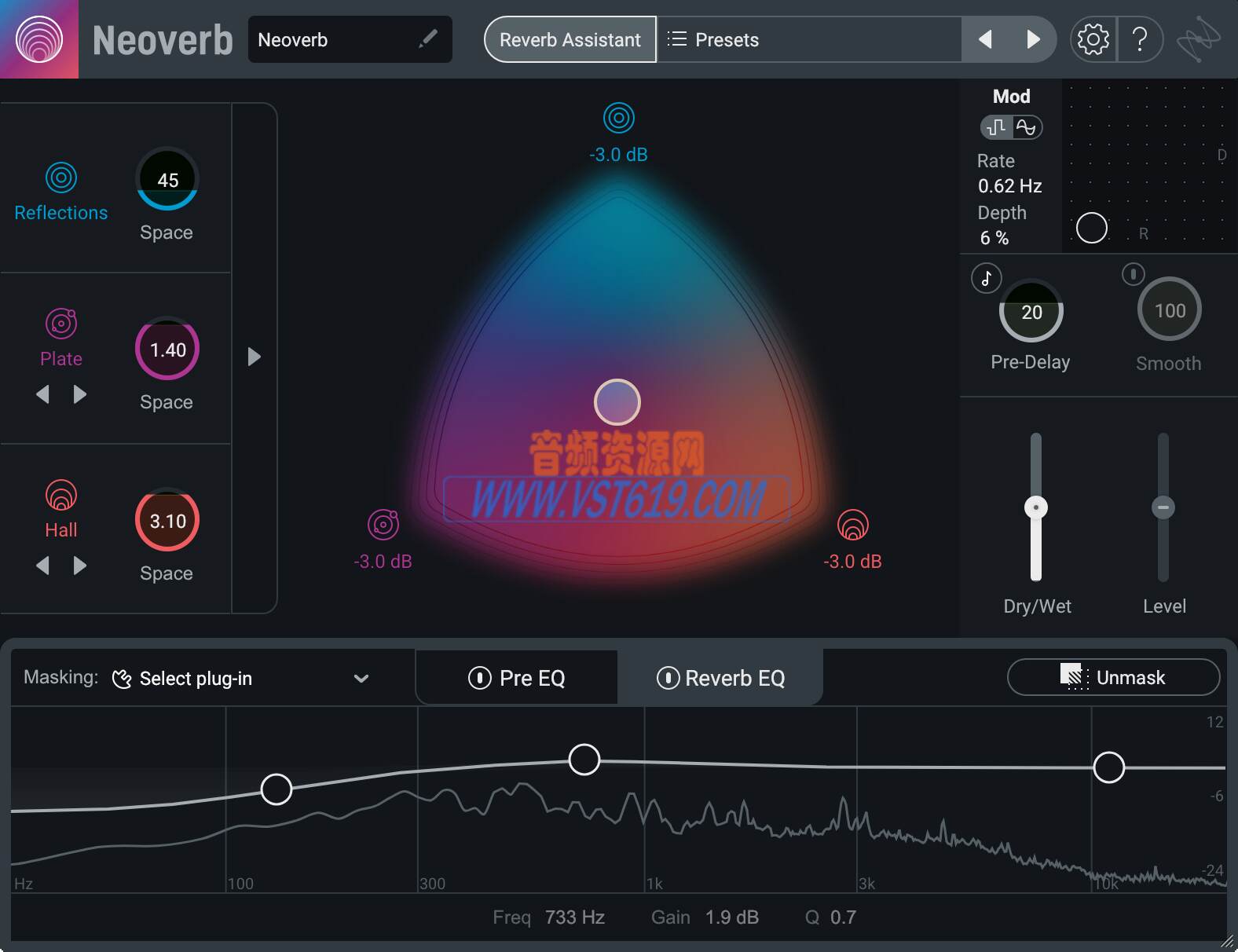
智能混响插件iZotope Neoverb
VST插件格式:
VST/VST3/AAX
iZotope Neoverb 是搭载 Exponential Audio 引擎的 AI 智能混响插件,内置混响助手,支持三种混响融合搭配,自带 AI 去掩蔽与掩蔽检测,快速为人声乐器塑造干净通透的空间氛围。
翻译:
Neoverb
专为音乐制作人打造的智能混响插件,利用人工智能驱动的功能,助您在更短时间内构建出理想的空间感与氛围。
会“聆听”的混响
iZotope Neoverb 由打造了 Ozone 和 Nectar 的团队开发,并搭载了久负盛名的 Exponential Audio 技术,是目前最智能的音乐制作混响插件。它能帮您告别反复尝试的繁琐过程,在几秒钟内为各类人声和乐器打造出独特的空间效果,且绝不会让混音变得浑浊。
认识 Neoverb
全新的实时“混响助手”(Reverb Assistant)能根据您的创作需求,引导您选择并融合不同的混响效果。内置的 AI 均衡器(EQ)能够分析您的音频,有效避免产生音染、浑浊感或频率遮蔽。您还可以深入探索“高级”面板,利用数十种针对人声和乐器设计的预设,打造出属于您的个性化音色。无论您是正在磨练技艺的新手,还是经验丰富的资深制作人,Neoverb 都能助您在更短时间内获得出色的混响效果。
快速找到理想混响
iZotope Neoverb 创新的“融合面板”(Blend Pad)与“混响助手”相辅相成,助您更高效地将多种混响类型融合成一个契合您作品的独特空间。
搭载 Exponential Audio 技术
Neoverb 采用了 Exponential Audio 著名的混响引擎。这些混响引擎灵感源自经典的录音室硬件,以其高品质算法和逼真的空间声学表现而备受推崇。将顶级的音质与 iZotope 直观的工作流程相结合,Neoverb 成为了一款足以应对各种混音挑战的利器。
为何选择 Neoverb?
设计与融合
您可以同时混合多达三种不同的混响效果,也可以让“混响助手”为您自动完成选择。您甚至可以在数字音频工作站(DAW)中对“融合面板”进行自动化控制,为您的混音增添灵动的变化!
精细雕琢
Neoverb 内置的 AI 均衡器能够分析您的音频并提供优化建议。其“去遮蔽”(Unmasking)技术能确保您的混响效果既能脱颖而出,又能与整体混音完美融合。
直观呈现空间感
通过数十种预设和丰富的高级调节选项,您可以随心所欲地加入个人风格,无论何种音乐流派,都能轻松驾驭。
功能特点:
快速找到理想的混响效果
Neoverb 旨在助您更高效地进行混音,轻松为您的作品找到最合适的混响组合。通过“混合面板”(Blend Pad),您可以在同一个插件内直观地融合三种不同的混响,从而为乐器和人声营造出各自独特的空间氛围。全新的“混响助手”(Reverb Assistant)能根据您的创作意图辅助混响融合,并通过精简的实时工作流程,自动为您调整各项高级参数。
让混响完美融入混音之中
Neoverb 内置基于人工智能(AI)的均衡器(EQ),能够分析您的音频内容,为各类音轨提供出色的混响音色。“预均衡器”(Pre EQ)配备“自动切除”(Auto Cut)功能,可在添加混响前自动清理输入信号,确保其以最佳状态呈现。此外,带有内置“遮蔽监测器”(Masking Meter)的“混响均衡器”(Reverb EQ)还能自动消除输入信号间的频率遮蔽,助您精准掌控混音中的混响效果。使用 Neoverb,无需复杂的插件链或繁琐的路由设置,即可获得理想的混响音质。
尽情探索,激发创作灵感
当您想要深入挖掘时,Neoverb 为您开启了一个广阔的混响世界,等待您去探索。通过“高级面板”(Advanced Panel)中的各项控件,您可以针对三种混响风格进行精细调节,解锁近乎无限的创作可能。您还可以直接选用由 iZotope 专业声音设计师团队精心打造的数十种预设,涵盖人声、各类乐器及不同音乐风格,助您快速获得所需的混响效果。
混合面板 (Blend Pad)
iZotope Neoverb 创新的“混合面板”(Blend Pad)能助您更高效地达成目标。它允许您同时混合三种不同类型的混响,从而打造出与您的音轨完美契合的独特混响尾音。
将多种混响类型融合,瞬间创造出独一无二的音色:利用“反射”(Reflections)营造逼真的空间感,通过“板式混响”(Plate)构建经典声学环境,或借助“大厅混响”(Hall)增添高度与深度。
每种混响类型均配有独立的“尺寸”(Size)控制,让您能够打造宏大的吉他音色、构建宽广的鼓组空间,甚至构想出充满异域风情的奇幻空间,赋予您的混音作品独特的个性。
“混合面板”支持自动化控制(Automation),这意味着您可以在歌曲中动态切换不同的混响组合,从而实现极具创意的音效变化与过渡效果。
混响助手 (Reverb Assistant)
通过简单易用的四步式“混响助手”,您可以为任意音轨打造出色的混响效果。该功能可实时调整 iZotope Neoverb 的各项设置,让您无需在繁琐的菜单中耗费时间,即可创建出复杂且高度定制化的混响效果。
只需选择您心仪的“空间大小”(Size) 和“风格”(Style),当您拖动滑块时,iZotope Neoverb 便会自动为您挑选并融合各种混响组合及高级参数设置。
利用四种不同的“音色”(Tone) 选项,您可以进一步微调混响质感,营造出深沉、通透或明亮的听感。
“混响助手”还会分析您的音频内容,并提供相应的均衡器 (EQ) 建议,助您获得最纯净、清晰的混响音色。
混响均衡器 (Reverb EQ)
iZotope Neoverb 的“混响均衡器”(Reverb EQ) 能够确保混音中的混响保持纯净且可控。它配备了基于人工智能的“去遮蔽”(Unmasking) 功能,能够自动分析音频并消除混响对干声信号的遮蔽,从而呈现出清晰、专业的音质。
无需冗长的插件链进行繁琐修正,仅需这一个插件,即可获得最纯净的混响音色。
通过“去遮蔽”(Unmask) 按钮,Reverb EQ 可以自动消除混响对干声信号的遮蔽,助您快速获得纯净的混响效果。
您可以让“混响助手”(Reverb Assistant) 自动为您配置“去遮蔽”功能,也可以直接在均衡器 (EQ) 窗口中进行手动调整,确保混响效果恰到好处。
预均衡器 (Pre EQ)
纯净的输入信号是获得出色混响音色的关键。iZotope Neoverb 的三段式“预均衡器”(Pre EQ) 能够分析您的音频,并建议您在哪些频段进行衰减。此外,您还可以通过搁架式滤波器 (shelving filters) 和各类频段滤波器,进一步自定义均衡设置。
在信号进入混响处理之前对其进行预处理,可有效避免湿声信号 (wet signal) 中出现不必要的频率堆积或共振。
使用“自动切除”(Auto Cut) 功能,让 Neoverb 分析您的信号并给出衰减建议,从而规避上述问题。
您既可以使用滤波器节点自定义衰减设置,也可以让 Neoverb 分析您的音频并为您提供优化建议。
高级面板 (Advanced Panel)
通过“高级面板”(Advanced Panel),您可以针对每个混响引擎自定义各项高级参数,从而更精准地掌控声音效果。如果默认效果未达到您的预期,不妨进入高级面板一探究竟,进行深度调整!
每个混响引擎都拥有独立且可自定义的参数,包括启动时间 (Attack)、分频点 (Crossover)、阻尼 (Damping) 等。
您可以将预延迟 (pre-delay) 和混响时间 (reverb time) 与宿主软件 (DAW) 的速度同步,让混响效果与您的音乐律动保持一致。
“混响助手”(Reverb Assistant) 也会自动配置高级面板中的参数,方便您查看并根据需要进行微调。
遮蔽指示器 (Masking Meter)
利用 iZotope Neoverb 的“遮蔽指示器”,您可以防患于未然,避免混音变得浑浊,并实时监控混音中混响的累积情况。该模块可与其他 iZotope 插件进行交互(通过“插件间通信”功能),向您展示混响在何处遮蔽了其他音轨。
您可以使用“干/湿 (Dry vs. Wet)”模式,查看混响对干声轨造成的遮蔽;也可以选择其他兼容的 iZotope 插件,检查混音中其他音轨是否存在遮蔽现象。
支持与其他兼容的 iZotope 插件(如 Neutron 3、Nectar 3 Plus、VocalSynth 2 和 Relay)协同工作。
平滑 (Smooth)、预延迟 (Pre-Delay) 与混音控制
Neoverb 的输入/输出 (I/O) 面板为您提供了更多混响调节方式。通过“平滑 (Smooth)”控件柔化瞬态,使混响听感更均匀;调节“预延迟 (Pre-Delay)”来增加深度感或距离感;利用“干/湿 (Dry/Wet)”和“电平 (Level)”滑块,实现自然的声音融合。
“平滑 (Smooth)”滑块基于瞬态塑形技术,能轻松抑制尖锐的打击类声源,防止其在混响中产生不自然的效果。
全局“预延迟 (Pre-Delay)”控件可调节混响反射的距离感,让您无需延长混响尾音,即可营造出空间感。
通过“干/湿 (Dry/Wet)”和“电平 (Level)”控件,实现混响信号与干声信号之间的自然平衡。
调制面板 (Mod Pad)
通过“调制面板 (Mod Pad)”为混响增添细腻的动态变化;该面板提供两种模式,既可实现微妙的修饰,也能创造出更具创意的混响调制效果。将调制量设为较低值,可使较长的混响尾音听起来更自然;若调高数值(最高可达 125%),则能获得更强烈的创意音效。
直观的 X/Y 轴控制面板,助您快速调出理想的参数设置。
“音高 (Pitch)”模式可产生细微的音高偏移,类似于多普勒效应。
“随机 (Random/RandomFat)”模式可产生随机化的调制效果,类似于经典的合唱 (Chorus) 效果。
原文:
Neoverb
The most intelligent reverb plug-in for music producers, with AI-driven features to design space and ambience in less time.
A Reverb That Listens
From the minds behind Ozone and Nectar, and powered by legendary Exponential Audio technology, iZotope Neoverb is the most intelligent reverb plug-in for music producers. Save time and leave the trial and error behind and design unique spaces for vocals and instruments in seconds, without muddying the mix.
Introducing Neoverb
A new real-time Reverb Assistant guides you in selecting and blending reverbs according to your creative needs. An AI-powered EQ section listens to your audio and helps you avoid artifacts, mud, and masking. Explore a deep Advanced panel and dozens of presets for vocals and instruments, and add your personal touch. Whether you’re a new producer honing your a craft, or a veteran on your latest project, Neoverb will help you get to a great reverb sound in less time.
Find your reverb, fast
iZotope Neoverb’s innovative Blend Pad and Reverb Assistant get you further, faster by helping you mix different types of reverbs into one unique space that fits your track
Made with Exponential Audio tech
Neoverb is powered by Exponential Audio’s famous reverb engines. Inspired by classic studio hardware, Exponential Audio reverbs are beloved for their high quality algorithms and realistic room sounds. Combine best-in-class sound quality with iZotope’s intuitive workflow, and you have a reverb plug-in ready to tackle any mix.
Why Neoverb?
Design & Combine
Blend up to three different reverbs at once, or let the assistant choose them for you. Automate the blend pad in your DAW to create exciting movement in your mix!
Carve it Out
Neoverb’s AI-powered EQs listen to your audio to make suggestions. Unmasking technology helps your reverb stand out in the crowd, or blend into the mix.
Visualize Your Space
Explore dozens of presets and advanced controls that let you add your own personal touch, no matter the genre.
Features:
Quickly get to the right reverb
Neoverb is designed to help you mix faster, and easily find the right blend of reverbs for your mix. The Blend Pad gives lets you intuitively mix three reverbs in one plug-in to place your instruments and vocals their own unique environments. A new Reverb Assistant helps you blend reverbs based on your creative intent, and adjusts Advanced parameters for you via a streamlined, real-time workflow.
Get your reverb to fit in the mix
Neoverb’s AI-powered EQs listen to your audio to give you a great reverb tone for any track. Use the Pre EQ with an Auto Cut function to automatically clean your input signal so it sounds its best before adding reverb. A Reverb EQ with a built-in Masking Meter, along with automatic Unmasking of the input signal, help keep your reverb under control in the mix. With Neoverb, you can achieve a great reverb sound without long plug-in chains or routing in your session.
Explore and get creative
When you’re ready to go deeper, Neoverb offers an endless world of reverb sounds to explore. Add your own unique touch with theAdvanced Panelcontrols with unique settings for all three reverb styles, for near-infinite creative possibilities. Or, get reverbs ready-made for vocals, instruments, and genres with dozens of unique presets made by iZotope’s team of professional sound designers.
Blend Pad
iZotope Neoverb’s innovative Blend Pad gets you further, faster, with controls to help you mix three different types of reverbs at once to create a unique reverb tail that fits your track.
Blend different types of reverb together to get a unique sound in seconds: Add realistic space with Reflections, classic environments with Plate, and height and depth with Hall.
Separate Size controls for each reverb type to let you create epic guitar tones, construct massive drum rooms, or dream up completely exotic spaces to make your mix unique.
The Blend Pad is automatable, so you can change between different blends of reverb for creative effects and transitions in your song.
Reverb Assistant
Get a great reverb for any track, with an easy four-step Reverb Assistant that adjusts the settings of iZotope Neoverb’s in real-time. Create complex, customized reverbs, without spending time in menus.
Choose your preferred Size and Style while iZotope Neoverb automatically selects and blends reverb combinations and advanced settings as you move the sliders.
Add a little vibe with four different Tone selections that further adjust your reverb to give you dark, airy, bright sounds.
Reverb Assistant listens to your audio and makes further EQ suggestions to get the cleanest possible reverb tone.
Reverb EQ
iZotope Neoverb’s Reverb EQ helps keep your reverb clean and under control in the mix, with AI-powered Unmasking that listens and unmasks your dry signal for a clean professional sound.
Mix your reverb, avoid long, corrective plug-in chains and get the cleanest reverb tone in just one plug-in.
The Reverb EQ can automatically unmask your dry signal to get a clean reverb tone quickly with the Unmask button.
You can have Reverb Assistant set up Unmask for you, or you can quickly access it in the EQ window to get your reverb sitting right.
Pre EQ
A clean input signal is key to a great reverb tone. iZotope Neoverb’s 3-band Pre EQ listens to your audio and suggests the best areas to cut. You can further customize the EQ with shelving and band-filters.
Treat your input signal before it hits the reverb to avoid unwanted build-up or resonances in your wet signal.
Use Auto Cut to have Neoverb listen to your signal and suggest areas to cut, in order to avoid.
Use filter nodes to customize your cuts, or let Neoverb learn your audio and make suggestions for you.
Advanced Panel
You can customize Neoverb’s advanced parameters within each reverb engine using the Advanced Panel for even greater control of your sound. If you don’t get the results you want, dive into the Advanced Panel and explore!
Individual, customizable parameters for each reverb engine, including Attack, Crossover, Damping, and more.
Sync your pre-delay and reverb time to your host tempo to create reverbs that move with your music.
Reverb Assistant also sets the Advanced Panel controls, so you can view and adjust your results.
Masking Meter
Stop muddy mixes before they happen and keep track of reverb build-up in your mix with iZotope Neoverb’s Masking Meter. The module communicates with other iZotope plug-ins (via Inter-Plugin Communication) to show you where your reverb is masking other tracks.
Use Dry vs. Wet mode to view masking over your dry track. Or, select another compatible iZotope plug-in to check masking on other tracks in the mix.
Works with other compatible iZotope plug-ins like Neutron 3, Nectar 3 Plus, VocalSynth 2, and Relay
Smooth, Pre-Delay, & Mixing Controls
Neoverb’s Input/Output (I/O) panel gives you more ways to mix reverb. Soften transients with the Smooth control to keep your reverb sounding even, control Pre-Delay to add depth or or a sense of distance, and create a natural blend with the Dry/Wet and Level slider.
Based on transient shaping technology, the Smooth slider lets you easily tame sharp, percussive sources so they don’t create unatural results in your reverb.
A global Pre-Delay lets you control the distance of your reverb reflection, letting you create a sense of space without resorting to longer reverb tails.
Create a natural balance of reverb and dry signal with Dry/Wet and Level controls.
Mod Pad
Add subtle animation to your reverb with a Mod Pad with two modes for both subtle and creative reverb modulation. Keep the Mod on low settings to make longer reverb tails feel more natural, or increase the setting (up to 125%) for more intense creative effects.
An intuitive X/Y Pad helps you quickly dial in the right setting.
Pitch mode creates a subtle pitch shift, similar to a Doppler-effect.
Random (‘RandomFat’) mode produces a randomized modulation effect akin to a classic chorus.
VST619音频资源网收集整理!


请登录后查看评论内容